Guide
New Zealand
How Cannonball works for New Zealand brands, and for Australian brands that also sell in New Zealand: which chains, NZ$ prices, regions and postcodes.
Availability From 10 October 2026, with the NZ supermarkets or Hardware retailer group.
New Zealand data starts on 10 October 2026. Until then, the New Zealand chains aren't in the app, and their retailer groups aren't on the Plans page.
Which chains#
| Chain | Retailer group | What we show |
|---|---|---|
| Woolworths NZ | NZ supermarkets | Price, promo, ranging and stock at every store |
| New World | NZ supermarkets | Price, promo and ranging at every store. Stock isn't read. |
| PAK'nSAVE | NZ supermarkets | Price, promo and ranging at every store. Stock isn't read. |
| Bunnings NZ | Hardware | Price, ranging and stock at every store. No promotions. |
| Mitre 10 NZ | Hardware | Price and promo, mostly the same at every store. Ranging and stock aren't read. |
Where a number isn't read, the app says "Not read" or "—", never zero, and that chain's stores are left out of that number's totals and alerts. Store counts and the full detail are on Chains and coverage.
Get New Zealand on your plan#
The New Zealand supermarkets are their own retailer group, NZ supermarkets: Woolworths NZ, New World and PAK'nSAVE. Bunnings NZ and Mitre 10 NZ are in the Hardware group, with Bunnings and Mitre 10 in Australia.
- Your plan includes the group most of your own products are sold through. For a New Zealand supermarket brand, that's NZ supermarkets.
- An Australian brand selling in New Zealand adds NZ supermarkets (or Hardware) from the Plans page, once its plan is paid.
- On the trial, you get every group, so you see your products wherever they're sold.
A group appears on the Plans page once it has data. See Retailer groups.
Prices are in NZ$#
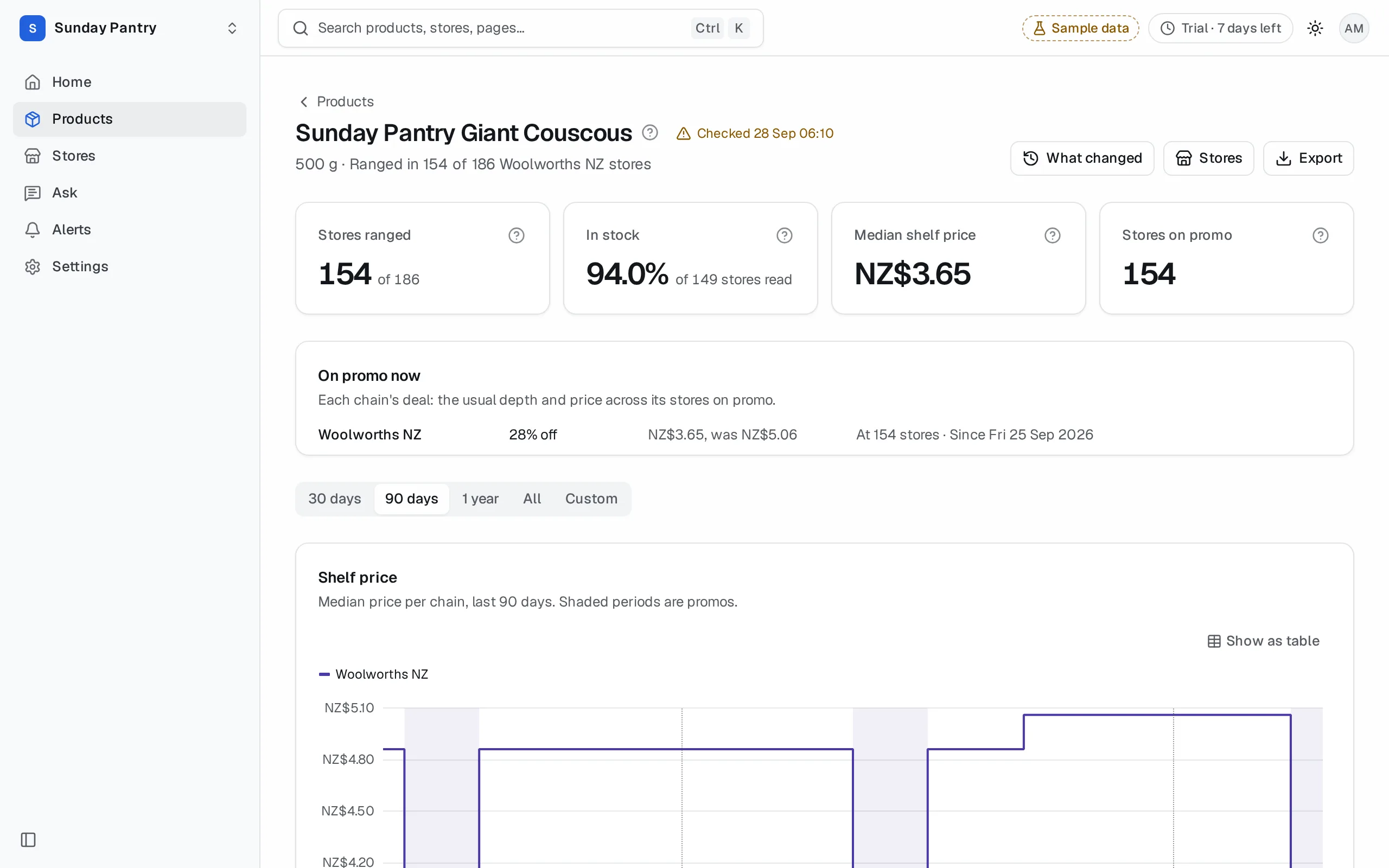
A product's prices are in its chain's currency: NZ$ at New Zealand chains, and $ (Australian dollars) at Australian ones. The app never adds, averages or compares A$ and NZ$ prices.
- Product page: the price, the price chart and promo prices read NZ$.
- Products: each product's price is in its own currency. Sorting by price keeps the currencies apart: every A$ price together, then every NZ$ one (the other way round from high to low).
- Stores and a store's page: prices at a New Zealand store read NZ$.
- What changed: a price change at a New Zealand chain reads NZ$, such as "NZ$4.50 → NZ$3.99".
- Alerts: a price rule on a New Zealand product is set, and emailed, in NZ$.
- Search: a price answer about a New Zealand product reads NZ$.
- Ask: a price question about New Zealand products answers in NZ$. See Mixed lists.
- CSV exports: in the Products, Stores and What changed CSVs, prices are plain numbers, with a Currency column that says AUD or NZD on every row that has a price. In the CSV of Home's changes, a price change reads with its symbol, such as "NZ$4.50 → NZ$3.99".
Regions instead of states#
New Zealand stores are grouped by region: Northland, Auckland, Waikato, Bay of Plenty, Gisborne, Hawke's Bay, Taranaki, Manawatū-Whanganui, Wellington, Tasman, Nelson, Marlborough, West Coast, Canterbury, Otago, Southland and the Chatham Islands.
Once the New Zealand chains are in, the app says Region where it said State, for every brand:
- On Stores, the column heading is Region, and the filter starts at All regions. Australian stores still show their state, such as NSW.
- The chain and region filters list Australia and New Zealand separately.
- The Stores CSV's column is Region too.
- On Home and What changed, a regional change names the region, such as "Auckland only". National means across that chain's stores in its own country.
Territories and postcodes#
Australia and New Zealand both use 4-digit postcodes, and some numbers are in both (3010 is in Melbourne and in Rotorua). So the Stores list reads a territory's postcodes in one country:
- The region you chose, if you chose one.
- Otherwise, the chain you chose.
- Otherwise, your brand's own country: New Zealand when every one of your products is at a New Zealand chain, else Australia.
The hint under Territory (postcodes) says which country it reads. To use the other country's postcodes, choose one of its chains or regions first:
- Go to Stores.
- Choose a New Zealand chain, such as Woolworths NZ, or a New Zealand region.
- Enter the postcodes under Territory (postcodes), such as 0600-0699, and click Show.
For an Australian brand that also sells in New Zealand, postcodes read as Australian until you do this. One territory covers one country: for a rep in each, set them up one at a time. See My stores, territory and map.
Mixed Australian and New Zealand lists#
If your list has products at Australian and New Zealand chains:
- Each product keeps its own currency. Products, Stores and the CSVs show both, row by row.
- Ask won't give one price across A$ and NZ$. A price question that names no chain answers each country on its own: the Australian chains' prices in $, then the New Zealand chains' in NZ$. Name a chain, such as "at Woolworths NZ", to ask about one.
What it can't tell you#
- Nothing before 10 October 2026. New Zealand history starts that day.
- Stock at New World, PAK'nSAVE and Mitre 10 NZ. It isn't read.
- Promotions at Bunnings NZ. It runs none.
- One price over both countries. A$ and NZ$ are never combined. Compare within one country.
Was this page helpful?
Updated 9 October 2026