Guide
Find what changed since a day
From Home's last week to any two days in your plan's history: every change on your products and rivals, the stores where it happened, narrowed to a chain, a state, or promos only.
Availability Every plan, within your plan's history. CSV export on Brand and up.
Three places answer "what changed since …?". Home shows the last week. What changed compares any two days. Stores that changed names the stores.
1. Start from Home's week#
Home lists the changes of the last week, newest day first and biggest first within each day, up to 20. If that covers your day, you're done. Click a change, or choose See the stores from its menu (⋮), to see where it happened. See Home.
For anything longer ago, or more than 20 changes, go on to What changed. When the week has more than Home shows, "See all N changes" under the list opens it for the same week.
2. Compare two days#
- On Home, click Compare dates. For one product, click What changed on its page instead.
- Under From, pick the day you're counting from. Under To, pick the last day, usually today.
- Click Compare.
The heading says how many changes there were after the From day, up to the To day. So "since 1 October" means From 1 October: a change on 1 October itself isn't in it. The list is newest day first, in the same sentences as Home. Click the "Show … more" button under it for the next page.
Open Every product on … and … below the list for the two days side by side: one row per product and chain, with Median price, Stores on promo, Stores ranged and In stock on each day, and the later value in bold where it moved.
What changed opens on the last day against a week before. See What changed.
3. Narrow it from a question#
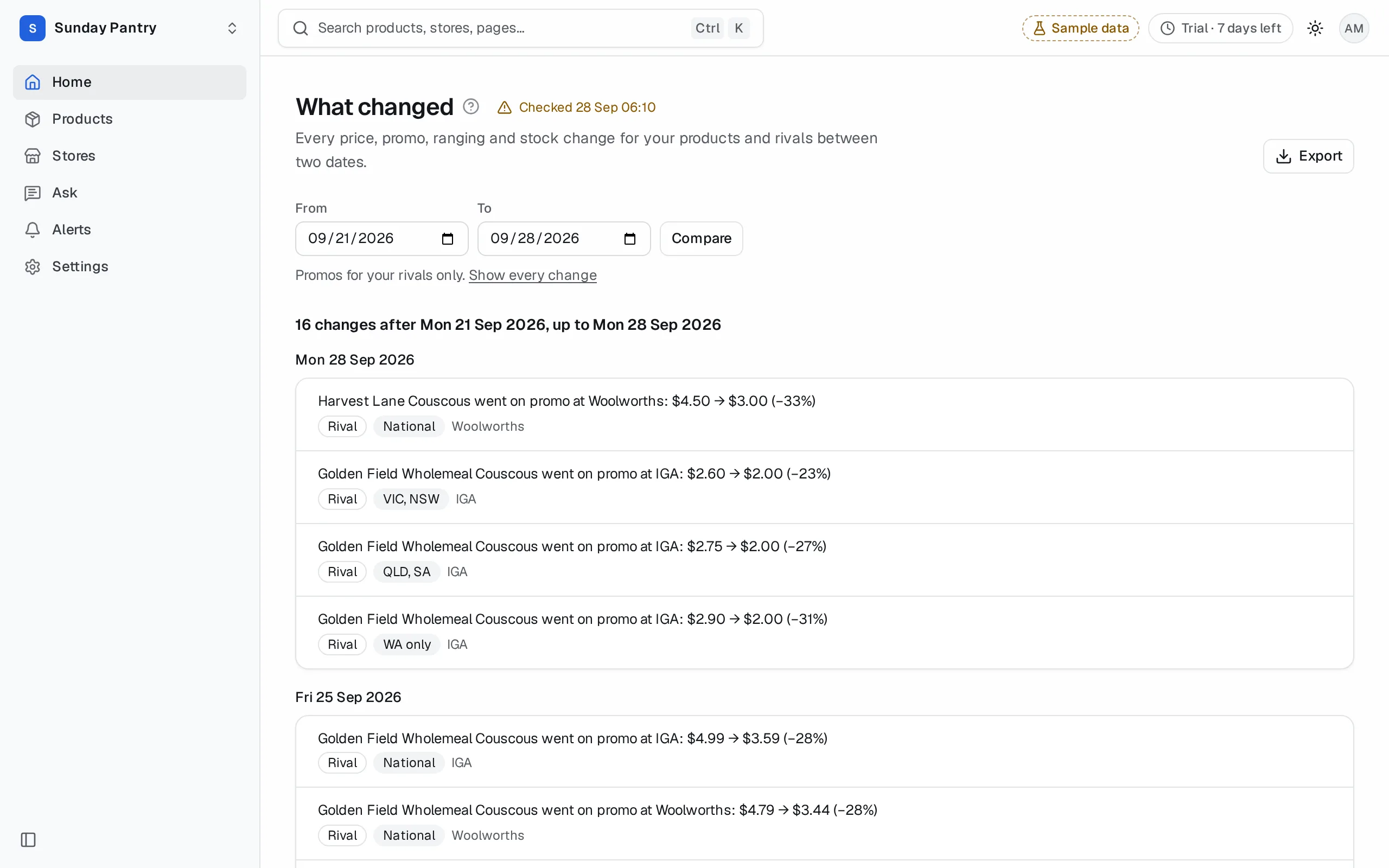
Type a question in the search bar (⌘/Ctrl then K), such as "Coles promos in WA since 1 October", "rival promos this week" or "where did we drop since Monday". Its result opens What changed already narrowed to what you asked:
- One chain, such as Coles.
- One state, or a New Zealand region. It keeps the changes across that state and the national ones. A change at a single store isn't kept, because it names the store, not the state.
- Promos only, or drops only.
- Your products or your rivals'. Store brands count as rivals.
A line above the list says what it's narrowed to, such as "Promos for your rivals at Coles in WA only." Changing the dates keeps it. Click Show every change to see every change again.
4. Name the stores#
What changed counts stores. To list them:
- Go to Stores.
- Under Change, choose what happened: Dropped, Added, Went out of stock, Back in stock, Went on promo, Came off promo or Price changed.
- Under Since the end of, pick your day.
- Click Show.
The list is the stores where it happened, for your products. For one product, open Stores from its page with Stores first. Add a chain, a state, My stores or a territory to narrow it. See Work a rep's territory.
The day can't be earlier than the first day there is data for. That's the first day of your plan's history, or, with one chain chosen, the chain's first day if it started later. A day before it, such as from an edited link or one made on a plan with more history, counts from that first day, and the date box shows it. Before then there's nothing to compare with, so every store would look like a change.
5. Export it#
- On What changed, click Export, then Changes (CSV) for the list, or Both days (CSV) for the side-by-side table. Both keep the product and the narrowing on screen. The Changes CSV holds the newest 5,000. For more, pick a shorter span or one product.
- On Stores, click Export, then CSV: stores. It keeps the change, the day and every other filter.
How far back you can go#
Your plan sets how far back you can look: 90 days on Solo, 12 months on Brand, and full history on Growth and Enterprise. Each chain's data also starts on the first day we read it.
- A From day before that starts the comparison on the first day it can, and says so: "Your plan shows history from …, so the comparison starts there." on a plan limit, or "Data starts on …, so the comparison starts there." where the data starts later.
- If both days are too early, What changed says the first day to pick from. On a plan limit it offers See plans.
Earlier days are kept, and open on a plan with more history. See History.
What it can't tell you#
- Why something changed. A drop says the stores stopped ranging it, not why.
- If there was no check on a day you pick, the comparison uses the last check before it, and says so.
- Pick two different days means both dates land on the same check.
Was this page helpful?
Updated 9 October 2026